On-Page SEO: A Practical Guide to Optimizing Your Website Pages
Getting the right keywords is only the beginning of SEO. Once you know what people are searching for and understand their search intent, the next step is to optimize your actual website pages.
This is where On-Page SEO becomes important.
On-page SEO is not about adding the same keyword repeatedly to a page. It is about making your content clear, useful, well-structured, and easy for both visitors and search engines to understand.
If you are building a website for a business, personal brand, or professional service, good on-page SEO can help your pages become more relevant to the searches you want to appear for.
What Is On-Page SEO
On-page SEO refers to the optimization of elements on a webpage to improve its visibility and relevance in search engines.
These elements can include:
- Page title
- Headings
- Website content
- Keywords
- Meta description
- URLs
- Images and alt text
- Internal links
- Content structure
- User experience
The goal is simple: help search engines understand your page while giving visitors a better experience.
For example, if you are writing an article about keyword research, the page should clearly explain keyword research instead of mentioning the phrase repeatedly without providing useful information.
Why Is On-Page SEO Important?
Imagine you have written a really useful article, but the page title is unclear, the headings are confusing, and the content has no proper structure.
Even good content can become difficult to understand.
On-page SEO helps organize your content so that visitors can quickly find the information they need.
It also gives search engines useful signals about what your page is about.
Some important benefits include:
- Better content structure
- Improved search relevance
- Easier navigation
- Better user experience
- More opportunities to rank for relevant searches
- Stronger connection between your content and search intent
SEO is not only about getting traffic. The traffic should come from people who actually find your content useful.
Important On-Page SEO Elements
There are several areas you should check when optimizing a webpage.
1. Page Title
The page title tells users and search engines what the page is about.
A good title should be:
- Clear
- Relevant to the content
- Naturally written
- Specific enough to attract the right audience
For example:
On-Page SEO: A Practical Guide to Website Optimization
is more useful than a vague title such as:
SEO Tips You Should Know
Your main topic should be clear from the beginning.
2. Headings and Content Structure
Headings make long content easier to read.
A well-structured article usually has one main H1 heading followed by relevant H2 and H3 headings.
For example:
H1: On-Page SEO: A Practical Guide
H2: What Is On-Page SEO?
H2: Why Is On-Page SEO Important?
H2: Important On-Page SEO Elements
H3: Page Title
H3: Headings
H3: Meta Description
H3: Images and Alt Text
This structure helps readers scan the article and understand how different sections are connected.
3. Using Keywords Naturally
Keywords still matter, but how you use them matters even more.
Your focus keyword should appear naturally in important areas such as:
- Title
- Introduction
- Relevant headings
- Main content
- URL
- Image alt text when genuinely relevant
For this article, the focus keyword is On-Page SEO.
There is no need to repeat it in every paragraph.
If the content is written naturally, related terms such as website optimization, SEO content, page structure, internal linking, search visibility, and user experience can also help explain the topic clearly.
4. Meta Description
A meta description gives users a short preview of what they can expect from a webpage in search results.
It should describe the page accurately and encourage the right person to click.
For this article, a suitable meta description is:
Learn what on-page SEO is and how to optimize your website content, headings, keywords, images, internal links, and page structure for better search visibility.
A meta description should describe the content rather than simply repeating keywords.
5. SEO-Friendly URLs
A clean URL makes the topic of the page easier to understand.
For example:
/on-page-seo-guide/
is better than a complicated URL containing unnecessary numbers or words.
Keep URLs:
- Short
- Relevant
- Easy to read
- Related to the page topic
Image Optimization for SEO
Images can make an article more engaging, but they should also be optimized properly.
When adding an image, consider:
- Relevant image content
- Descriptive file name
- Useful alt text
- Appropriate image size
- Page loading speed
For example, instead of an image file named:
IMG_2026_09_15.jpg
you could use:
on-page-seo-website-optimization.jpg
The alt text should describe the image naturally.
Example alt text:On-page SEO elements for website optimization
Don’t use alt text as a place to repeatedly insert keywords. It should help explain the image, especially for accessibility.
Internal Linking and On-Page SEO
Internal links connect one page of your website to another.
They can help visitors discover related content and make your website easier to navigate.
For example, this article can link to your earlier blogs about:
- [What Is Digital Marketing? A Practical Beginner’s Guide]
- [How Does Digital Marketing Work?]
- [SEO for Small Businesses]
- [Basic SEO Techniques for Beginners]
- [Keyword Research for Beginners]
- [Search Intent in SEO]
This creates a connected content structure instead of having every blog exist as a separate page.
For your website, internal linking can also help create a clear path from digital marketing basics → SEO → keyword research → search intent → on-page SEO.
On-Page SEO and Search Intent
Your previous blog focused on search intent, and this is where it becomes useful in practice.
Before optimizing a page, ask yourself:
What does the person actually want when they search this keyword?
For example, someone searching for:
“keyword research for beginners”
probably wants an educational guide.
Someone searching for:
“SEO agency in Kannur”
may be looking for a service.
The content, page structure, and call to action should match that intent.
This is why SEO is more than placing keywords on a webpage. The page needs to satisfy the reason behind the search.
On-Page SEO for Small Businesses
For small businesses, on-page SEO can be especially useful because every important service page and location page should clearly communicate what the business offers.
For example, a local business website might have pages for:
- Main services
- Individual services
- About the business
- Contact information
- Frequently asked questions
- Location-specific services
- Helpful blog content
Each page should have a clear purpose.
If a business serves customers in Kannur, relevant local information can be included naturally rather than adding “Kannur” to every sentence.
This is also important when building a professional online presence as a Digital Marketing Strategist in Kannur. Your website should clearly communicate your services, expertise, location, and the type of clients you want to reach.
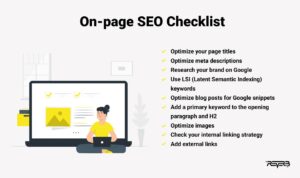
A Simple On-Page SEO Checklist
Before publishing a page, take a few minutes to check the following:
☐ Is the main topic clear?
☐ Does the page have one clear H1?
☐ Is the focus keyword used naturally?
☐ Does the title describe the page accurately?
☐ Is the meta description relevant?
☐ Is the URL short and meaningful?
☐ Are headings properly organized?
☐ Does the content answer the reader’s question?
☐ Are relevant internal links included?
☐ Are images optimized?
☐ Does every important image have useful alt text?
☐ Is the page easy to read on mobile?
☐ Does the content match search intent?
This small checklist can prevent many basic SEO mistakes.
Common On-Page SEO Mistakes
Even when people understand the basics, some mistakes are still common.
Keyword Stuffing
Repeating a keyword excessively can make content difficult to read.
Write for people first and use keywords where they make sense.
Writing Only for Search Engines
A page may contain all the expected SEO elements but still provide little value.
SEO should support useful content, not replace it.
Ignoring Search Intent
If the content does not match what people are looking for, ranking alone will not solve the problem.
Poor Page Structure
Large blocks of text with no headings or spacing can make visitors leave quickly.
Forgetting Internal Links
Publishing useful articles without connecting them means visitors may never discover your other content.
Using Generic Image Alt Text
Alt text such as “image” or “photo” does not explain what the image represents.
How On-Page SEO Fits Into Your SEO Process
On-page SEO becomes much easier when you follow a proper sequence.
A simple process looks like this:
Keyword Research → Search Intent → Content Planning → On-Page SEO → Publishing → Performance Monitoring
You first identify what people search for.
Then you understand their intent.
After that, you create useful content and optimize the page around the topic.
Finally, you monitor the results and improve the page when necessary.
This approach is more practical than publishing content randomly and hoping it ranks.
Final Thoughts
On-page SEO is about making every webpage clearer, more useful, and easier to understand.
It starts with the basics: a clear title, useful content, proper headings, natural keyword usage, optimized images, internal links, and a structure that makes sense to the reader.
When combined with keyword research and search intent, on-page SEO becomes much more effective.
You don’t need to make every page perfect before publishing it. Start with a strong foundation, monitor how the page performs, and improve it over time.
For anyone learning digital marketing or building a professional website, understanding On-Page SEO is an important step toward creating a stronger and more visible online presence.